
Shopify introduces automatically generated store policies
Shopify has introduced automatically generated policies to help merchants launch their stores faster and make it easier to expand into new markets.
You can now automate the following policies:
- Return and refund policy
- Contact information
- Terms of service
- Shipping policy
- Legal notice
When automated, Shopify keeps these policies updated as your store settings change and keeps them in sync with Shopify’s recommendations.
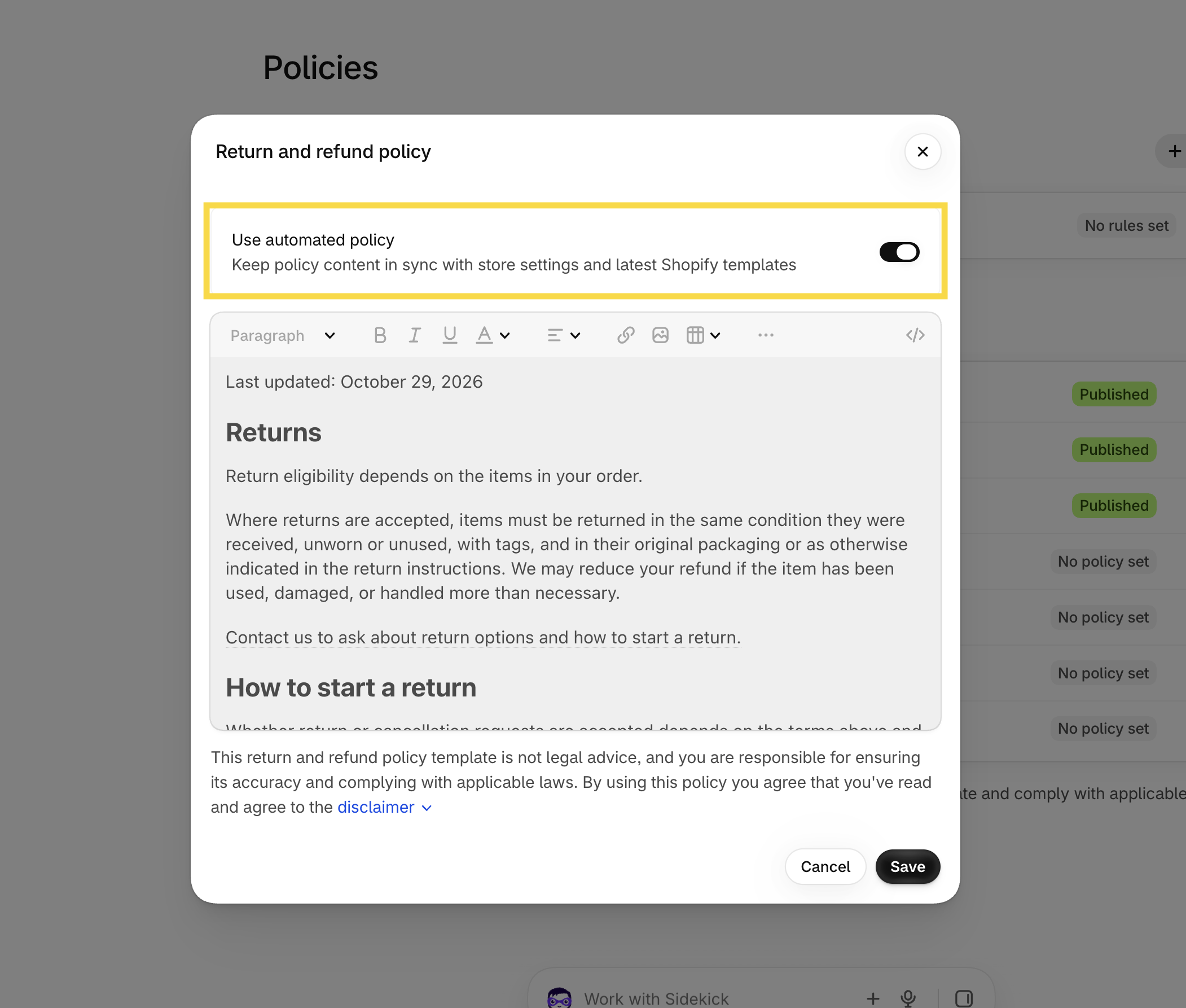
How to enable automated policies
You can activate the feature directly in your Shopify admin:
- Go to Settings → Policies
- Select the policy you want to automate, enable Use automated policy.
- Then click Save.
What does this mean for your store?
This can save you time when setting up a new store or expanding into new markets, as Shopify can generate and maintain the relevant policy content based on your store settings.
However, automated policies don’t replace your responsibility for your store’s legal compliance. Shopify explicitly states that merchants remain responsible for their policies and compliance with applicable laws.
We therefore recommend reviewing the generated policies and making sure they are appropriate for your specific business and the markets you sell to.
Overall, it’s a useful update that can make the initial store setup a little faster and reduce the need to manually update policies when your store settings change.